Best HomeKit & Matter Light Switches and Relays for Europe (2026)
Replace the switch or hide a relay behind it? We compare the smart light switches, dimmers and flush-mounted relays from Aqara, Eve, Shelly, Meross and Tapo that really work in Apple Home, explain neutral vs no-neutral wiring in European homes, and say honestly which hub or Thread border router each one needs.

Smart bulbs are great until someone flips the wall switch and the bulb drops off the network. Smart switches and in-wall relays fix that from the other end: they make the wiring itself smart, so every lamp on the circuit works with Siri, scenes and automations, and the switch on the wall still does what guests expect. The catch in Europe is the wiring. Many homes have no neutral wire at the switch, flush boxes vary in depth, and stairways and hallways often use two-way switching. This guide sorts out what fits and recommends the switches and relays from our catalog that really work in the Apple Home app.
How we chose
We started from every switch, dimmer and relay in our catalog that is sold in European Amazon stores and says it works with Apple Home. Then we narrowed it down:
- Works in Apple Home today. Every pick works in the Home app natively through HomeKit or through Matter, without Homebridge or other workarounds.
- Honest about hubs. We say exactly what each device needs: a Thread border router, a Wi-Fi network, or a maker's hub. For automations and remote access, every Apple home also needs a home hub (a HomePod or Apple TV).
- Made for EU wiring. Devices for European round flush boxes and 230 V circuits, with options for homes without a neutral wire.
- Local control. Thread and Matter devices keep working on your home network when the internet or the maker's cloud is down. We favour those.
- Availability. Products you can buy in several EU countries, so the same advice works in Germany, France, the Netherlands and Spain.
Prices change too often to be useful in an article, so we leave those to the product boxes, which show a current price where one is available.
Switch or relay: which do you need?
There are two ways to make a light switch smart, and the right one depends on how attached you are to your current switches.
- A smart wall switch replaces the switch you have. You see it every day, so the design, the feel of the buttons and the frame matter. It's the easiest option to understand for everyone in the house.
- An in-wall relay (also called a flush-mounted module) goes into the flush box behind your existing switch. The switch keeps its look and still works as normal, while the relay adds app, Siri and automation control. It's the way to go if you have a switch range you like, such as Gira, Jung, Busch-Jaeger or Legrand, or if you rent and want to keep the original switches.
Either way, this is mains wiring. Switch off the circuit breaker first, and in many EU countries the installation should be done by a qualified electrician.
Best smart wall switch: Aqara Light Switch H2 EU
The Light Switch H2 EU is the most flexible wall switch for Apple homes in Europe. It runs on Thread or Zigbee: in Thread mode it joins Apple Home directly through Matter, with no Aqara hub needed. In Zigbee mode it goes through an Aqara hub instead, which unlocks more of Aqara's own features in the Aqara Home app.
Its biggest strength for older European homes is that it works with or without a neutral wire. Without one, it still switches your lights, but power monitoring and overload protection need the neutral connection. The buttons can also be set to a wireless mode, so a button triggers a scene instead of cutting power, which is handy if the circuit has smart bulbs. Aqara also sells a version with four buttons and two channels for two lights from one switch position.
What it needs: in Thread mode, a Thread border router (HomePod mini, HomePod 2nd generation or later, or an Apple TV 4K with Thread). In Zigbee mode, an Aqara hub.
Best for Apple-only homes: Eve Light Switch
Eve, from Munich, designs for Apple Home first, and the Eve Light Switch shows it. It connects over Thread and works in the Home app without an Eve account or cloud. Schedules are stored on the switch itself, so they run even when your iPhone and home network are offline.
It's designed for European installations: it comes with a 55 mm switch plate and frame and fits into existing 55 mm multi-gang frames, and it handles one-way, two-way and intermediate switching, so you only need to replace one switch on a staircase. Eve also offers matching plates for other switch ranges.
What it needs: a neutral wire at the switch, and a Thread border router such as a HomePod mini or an Apple TV 4K with Thread. It has no dimming, so pick the Aqara dimmer below for that.
Best smart dimmer switch: Aqara Dimmer Switch H2 EU
The dimmer version of the H2 has the same Thread-or-Zigbee choice and the same neutral-or-no-neutral flexibility. It dims dimmable LED, halogen and incandescent lamps up to 200 W, and it needs a flush box at least 40 mm deep, which suits many older walls. With a neutral wire you also get overload protection.
What it needs: a Thread border router to use it through Matter in Apple Home, or an Aqara hub in Zigbee mode. Check that your bulbs are dimmable before you buy.
Best in-wall relay: Shelly 1 Mini Gen4

Bulgarian maker Shelly has become the reference for small in-wall relays. The 1 Mini Gen4 is tiny, so it fits behind a switch even in a crowded flush box, and it controls lights and small appliances up to 8 A. Your existing switch is wired to the relay's input, so it keeps working as normal.
Gen4 adds Matter built in, so the relay joins Apple Home over 2.4 GHz Wi-Fi without a hub. The Shelly app adds schedules, scripting and a local web interface, and the relay also works with Home Assistant if you run it alongside Apple Home.
What it needs: a neutral wire and a 2.4 GHz Wi-Fi network. No hub, though a HomePod or Apple TV is needed for automations and remote access.
Best budget relay: Meross MSS815
The Meross MSS815 is a simple, affordable way to make one light circuit smart. It's a Matter relay over Wi-Fi with energy monitoring, so you can see how much a light or appliance uses. It handles up to 10 A and is meant for flush boxes at least 60 mm in diameter and depth.
What it needs: a neutral wire (usually the blue one) and 2.4 GHz Wi-Fi. No hub. It's a bit larger than the Shelly, so check the space behind your switch first.
Best relay without a neutral wire: Shelly 1L Gen3
Many older flats in Germany, France, Italy and elsewhere have only the live wire and the switched wire to the lamp at the switch, with no neutral. Most Wi-Fi relays can't work like that, but the Shelly 1L Gen3 can. It switches lights up to 200 W using only the live and switched wires, and it supports Matter, so it works in Apple Home without a hub.
The package includes the Shelly Bypass, which goes next to the lamp and keeps the relay stable with low loads between 5 and 20 W, where LED lamps would otherwise flicker or glow faintly when they're off.
What it needs: 2.4 GHz Wi-Fi, and space at the lamp for the bypass if your lights draw little power.
Best dimmer relay: Shelly Dimmer Gen4
If you want to dim lights but keep your existing switch, the Shelly Dimmer Gen4 goes behind it. It's Matter certified, dims LEDs, halogen lamps and ferromagnetic transformers, and lets you set how gently the light fades on and off.
It also works without a neutral wire. With lights under 20 W you'll need a Shelly Bypass for stable dimming, so check whether it's included with your pack. A push-button switch is the most natural fit for dimming, since you hold it to change the brightness.
What it needs: 2.4 GHz Wi-Fi. No hub.
Best for two lights or shutters: Tapo S112
The Tapo S112 has two channels, so one module behind a double switch can control two separate lights or sockets of up to 6 A each. Set it to shutter mode and it controls a roller shutter motor instead, which is very common in European homes. It joins Apple Home through Matter over Wi-Fi, has energy metering in the Tapo app, and uses Bluetooth for setup and local control.
What it needs: 2.4 GHz Wi-Fi and, like the other Wi-Fi relays here, a neutral wire at the switch. No hub.
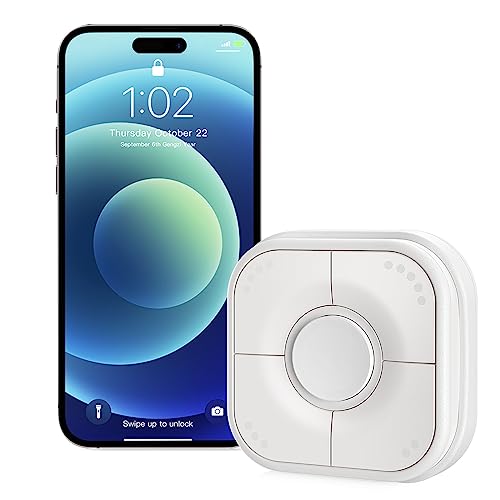
Best wireless switch: Onvis Smart Button
Sometimes the switch you need is where there's no wire, like next to the bed or at the far end of a long room. The Onvis Smart Button is a battery-powered Thread button for Apple Home. Each button supports a single press, a double press and a long press, and you set what each one does in the Home app: switch a light, start a scene or close the shutters. A magnetic holder and adhesive backing let you put it on a wall, a bedside table or the fridge.
What it needs: a Thread border router that also acts as your home hub, such as a HomePod mini, HomePod 2nd generation or an Apple TV 4K with Thread.
What to know before you buy
Neutral or no neutral?
Open the flush box with the power off and look for a blue wire. If there's a blue neutral wire connected or tucked away in the box, you can use any device in this guide. If you only find the live wire and the switched wire to the lamp, choose a device made for no-neutral wiring: the Aqara H2 switch or dimmer, the Shelly 1L Gen3 or the Shelly Dimmer Gen4. No-neutral devices power themselves through the lamp, so very low LED loads can need a bypass.
Thread, Wi-Fi or a maker's hub
Thread devices (Eve, Aqara in Thread mode, Onvis) use a low-power mesh network and respond instantly. They need a Thread border router, which in Apple homes is a HomePod mini, a HomePod (2nd generation or later) or an Apple TV 4K with Thread. The Wi-Fi-only 64 GB Apple TV 4K (3rd generation) has no Thread radio. Matter over Wi-Fi relays (Shelly, Meross, Tapo) only need your 2.4 GHz network. Zigbee devices, such as Aqara in Zigbee mode, need the maker's hub, which then brings them into Apple Home. For automations and control away from home, every setup needs a HomePod or Apple TV as home hub.
Flush boxes and space
European round flush boxes are usually 60 mm in diameter, but their depth varies a lot. Relays sit behind the switch, so a deep box makes installation much easier. Two-gang positions often have more room in one box than the other. If space is tight, choose the smallest relay (Shelly 1 Mini Gen4) or a switch that only needs a shallow box (Aqara Dimmer Switch H2, at least 40 mm).
Smart bulbs and smart switches together
If a circuit already has smart bulbs, cutting their power makes them unreachable in the Home app. Use a switch or relay with a wireless or detached mode, where the button sends a command instead of cutting power, or add a wireless button like the Onvis instead.
Two-way switching
Hallways and staircases often have two or three switches for one light. Smart wall switches like the Eve Light Switch replace one switch in the chain. With a relay, the relay sits at the light or at one switch, and the existing switches act as its inputs. Wiring varies here, so it's a job for an electrician.
Side by side
| Product | Brand | HomeKit / Matter | Price |
|---|---|---|---|
 Aqara Light Switch H2 EU |
Aqara | HomeKit Zigbee Matter Light Switch | €41.99 |
 Eve Light Switch (Apple Home) |
Eve | HomeKit Bluetooth Light Switch Thread | €88.40 |
 Aqara Dimmer Switch H2 EU |
Aqara | HomeKit Zigbee Hub required Dimmable | €49.99 |
|
Shelly 1 Mini Gen4 WLAN & Matter Smart Relay Switch
|
Shelly | HomeKit Zigbee Matter Wifi | €13.75 |
 Meross Matter WLAN Switch Flush-Mounted MSS815 |
Meross | HomeKit Matter Wifi | €14.99 |
 Shelly 1L Gen3 with Bypass |
Shelly | HomeKit Matter Wifi Bluetooth | €27.90 |
 Shelly Dimmer Gen4 - WLAN Smart Dimmer |
Shelly | HomeKit Zigbee Dimmable Matter | €34.99 |
 Tapo S112 2-Channel Relay |
Tapo | HomeKit Matter Wifi Bluetooth | €19.00 |
 Onvis Thread Smart Button for Apple Homekit |
Onvis | HomeKit Bluetooth Thread | €34.99 |
Our verdict
To replace your switches, buy the Aqara Light Switch H2 EU: it works with or without a neutral wire, joins Apple Home over Thread and Matter, and has a matching dimmer. Choose the Eve Light Switch if you only use Apple and have a neutral wire. To keep the switches you have, put a Shelly 1 Mini Gen4 behind them, or the Meross MSS815 on a tighter budget. In homes without a neutral, use the Shelly 1L Gen3 for switching and the Shelly Dimmer Gen4 for dimming. The Tapo S112 covers double switches and roller shutters, and the Onvis Smart Button adds a switch where there's no wire at all.
Frequently asked questions
Do I need a neutral wire for a smart light switch?
Not always. Most Wi-Fi relays and the Eve Light Switch need a neutral wire at the switch. The Aqara Light Switch H2 EU and Dimmer Switch H2 EU, the Shelly 1L Gen3 and the Shelly Dimmer Gen4 also work without one. Without a neutral, very low LED loads can flicker, which a bypass at the lamp fixes.
Do I need a hub for smart light switches in Apple Home?
It depends on the connection. Thread switches need a Thread border router, such as a HomePod mini, a HomePod (2nd generation or later) or an Apple TV 4K with Thread. Matter relays over Wi-Fi need no extra hub. Zigbee switches need the maker's hub. For automations and remote control, Apple Home always needs a HomePod or Apple TV as home hub.
Can I keep my existing light switches?
Yes. An in-wall relay such as the Shelly 1 Mini Gen4, Meross MSS815 or Tapo S112 goes into the flush box behind your switch. The switch keeps its look and keeps working, while the relay adds control from the Home app, Siri and automations.
Is Thread or Wi-Fi better for light switches?
Thread switches respond very quickly, don't load your Wi-Fi and strengthen the Thread mesh, but they need a Thread border router. Wi-Fi relays with Matter are cheaper and need no extra hardware beyond your router. Both are controlled locally in Apple Home, so they keep working when the internet is down.
Can I install a smart switch or relay myself?
It's mains wiring at 230 V. Always switch off the circuit breaker and check the wires are dead first. In many EU countries, electrical installation work should be done by a qualified electrician, and doing it yourself can affect your insurance, so check the rules where you live.
What happens if my Wi-Fi or internet goes down?
The light still works with the switch on the wall. Matter and Thread devices also keep working in the Home app on your local network without internet.
As an Amazon Associate we earn from qualifying purchases. Links to Amazon and other shops on this page are affiliate links.