Best HomeKit & Matter Temperature & Humidity Sensors for Europe (2026)
Eve, Aqara, Qingping, SwitchBot, Meross or Netatmo? We compare the temperature and humidity sensors that work with Apple Home in Europe, show which ones need a hub or bridge, and cover weather stations and CO2 monitors.
A temperature and humidity sensor is a small, simple way to make a home healthier. It tells you when the bathroom never dries out and mould is waiting to happen, when the nursery is too warm at night, when the cellar or greenhouse drifts out of range, and when the heating is running against a room that is already warm. In Apple Home you can go one step further and let the reading act: switch on a dehumidifier or a fan when humidity rises, or start the heating when a room drops below the temperature you want. This guide sorts out which sensors really work with Apple Home in Europe, how each one gets there, and which one we would put in our own home first.
If you already own a HomePod mini or a HomePod (2nd generation), start there: both have a built-in temperature and humidity sensor that shows up in the Home app, so you can build your first automations before you buy anything.
How we chose
We started from every temperature and humidity sensor in our catalog that is sold in European Amazon stores and works with Apple Home, either natively through HomeKit, through Matter, or through a named bridge. Then we narrowed it down:
- Works in the Apple Home app. Every pick shows its readings in the Home app and can answer Siri. We say plainly when it needs a brand hub or bridge.
- Local and private where possible. Thread and Matter sensors keep reporting on your home network when the internet is down. We favoured them.
- Readable. Some sensors have a display, so you can see the room without opening a phone. We point those out.
- Honest about limits. If a sensor shows a reading in Apple Home but can't trigger an automation from it, we say so.
- Availability. Products you can buy in several EU countries, not one-off imports.
We don't quote prices in the text, because they vary by store and day. The product boxes show what Amazon lists.
Our top pick: Eve Weather (Matter)
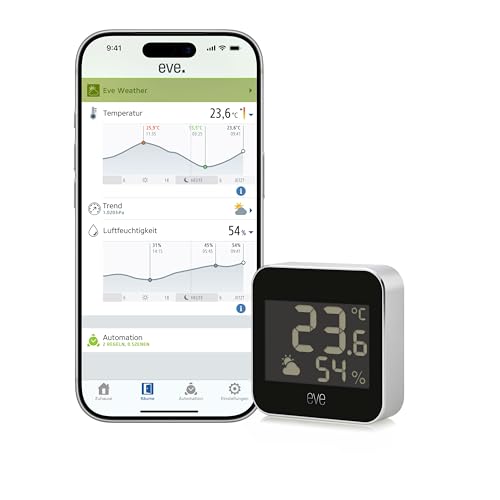
Eve Weather is the sensor we would buy first. It measures temperature, humidity and air pressure, and it runs Matter over Thread, so you add it straight to the Home app by scanning its code. There is no Eve cloud, no registration and no Eve account, and it keeps reporting on your home network if the internet goes down. A small display on the front shows the weather trend, so you can check on a room or a covered patio at a glance.
It has an IPX4 rating and an operating range from -18 °C to 55 °C, which makes it as comfortable on a balcony wall as on a bookshelf. It runs on a replaceable CR2450 coin cell that Eve rates for a year or more, and it records a reading every 10 minutes. That is plenty for humidity and temperature, which change slowly, and it is what keeps the battery going.
What it needs: a Thread border router, which in an Apple home means a HomePod mini, a HomePod (2nd generation) or an Apple TV 4K with Thread. Because it's Matter, you can also share it with Google Home, Alexa or Home Assistant later. Eve Weather is a battery device, so it doesn't strengthen the Thread network. If you put it outdoors, a mains-powered Thread device such as a smart plug indoors, near the wall, helps it stay connected.
Best for room climate and presence in one: Aqara FP300

The FP300 is a 5-in-1 sensor: it detects presence with PIR and a 60 GHz radar, and it also measures light, temperature and humidity. In a bathroom or a bedroom that means one battery device that reports humidity for your fan or dehumidifier automations and can also switch the light on when someone walks in.
It supports both Thread and Zigbee. In Thread mode you add it to Apple Home through Matter without an Aqara hub, which is the setup we mean here. Aqara rates the two CR2450 batteries for up to two years in Thread mode. The trade-off is that the finer settings, such as switching individual sensors off or changing how often they report, only work in Zigbee mode with an Aqara hub and the Aqara app. In Thread mode you get the readings, and in Apple Home that is what automations need.
Best with an e-ink display: Qingping Temp & RH Monitor

Qingping's thermometer has an e-ink screen that looks like printed paper, stays readable at any angle and uses almost no power while the number isn't changing. It works with Apple Home over Thread or Bluetooth: with a HomePod mini or an Apple TV 4K that has Thread, it connects over Thread, otherwise over Bluetooth. Qingping says it sends new readings to your hub every 10 minutes, and the Qingping+ app can export the last 30 days of data.
It is built for Apple users: the listing says it works with iOS only, and you add it in the Home app. Don't leave it in a place where humidity stays above 90 percent for a long time, so it is a living-room and bedroom sensor, not a shower-room one.
Best large display, with a Meross hub: Meross Matter 10-in-1 Smart Thermometer Hygrometer

If you want a sensor you read from across the room, this one has a 3.7-inch LCD that shows temperature, humidity, light level, date, time and a comfort index. It connects over Wi-Fi to a Meross hub and the hub brings it into Apple Home. With the Meross MSH450 hub it joins as a Matter accessory, and with the older MSH300 and MSH400 hubs it joins through HomeKit. Check which hub you own, or buy one with it, because the sensor does not appear in Apple Home without a hub.
It also has two programmable buttons for controlling other Meross devices, which makes it useful on a bedside table or in a nursery. If you already have a Meross hub for plugs or thermostats, it is an easy add-on.
Best for several rooms on a budget: SwitchBot Thermo-Hygrometer 3-Pack with Hub Mini Matter

SwitchBot's hygrometers are Bluetooth devices, so on their own they don't reach Apple Home. The Hub Mini Matter in this bundle is the bridge: it brings the sensors into Apple Home as Matter accessories, and a single Hub Mini Matter can carry up to four of them. The sensors are IP65 dust and water resistant, so they suit a bathroom, a greenhouse or a balcony as well as a bedroom, and SwitchBot says they use a Swiss Sensirion sensor accurate to about ±0.2 °C and ±1.8 % relative humidity.
Apple Home shows the readings and can run automations from them, as long as you have a HomePod or an Apple TV as your home hub. The SwitchBot app keeps the history. Three sensors for one hub is a good way to cover the bedroom, the bathroom and the cellar.
More sensors, plus a display: SwitchBot Matter Thermometer Hygrometer 4-Pack with Hub 2

This bundle has four IP65 sensors and the SwitchBot Hub 2. The hub is itself a thermometer and hygrometer with a large LED screen, and it also learns infrared remotes, so it can control an air conditioner or a fan that has no smart features of its own. Like the Hub Mini Matter it brings the sensors into Apple Home as Matter accessories. Choose this one if you want more than three sensors or a hub with a display and IR control.
Best for indoor and outdoor together: Netatmo Weather Station
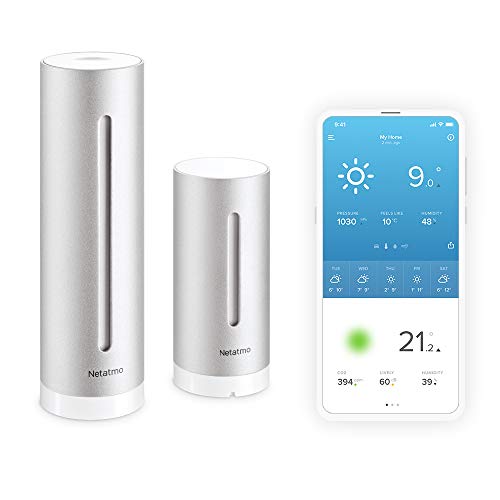
The Netatmo Weather Station is a Wi-Fi station with an indoor module and a wireless outdoor module. It works with Apple Home through native HomeKit: you add the station with its HomeKit code and the modules appear in the Home app with temperature and humidity, and the indoor module also shows CO2 and air quality. Pressure, noise, rain and wind stay in the Netatmo app. It needs a 2.4 GHz Wi-Fi network, and Netatmo sells extra indoor modules, a rain gauge and a wind gauge separately.
One limit matters if you plan to automate. Netatmo says that in Apple Home the station can trigger automations from CO2 and air quality, but not from temperature or humidity. For a dehumidifier automation, choose one of the Thread or Matter sensors above. For a weather station you read and talk to, this is still the most complete system in the guide.
Weather station with a display and a Matter hub: SwitchBot Meter Pro Weather Station

SwitchBot's weather station pairs the Meter Pro, which has a large display with temperature, humidity, time, date, comfort level and a forecast, with an IP65 outdoor sensor and a Matter hub. The readings reach Apple Home through the hub, and automations need a HomePod or an Apple TV as home hub. Up to two outdoor sensors can be paired, which suits a garden plus a greenhouse. It is a good choice if you want a display on a shelf and the outdoor reading in the Home app.
Step up for air quality: Qingping Air Monitor Lite

Humidity is only part of a healthy room. The Qingping Air Monitor Lite measures CO2, PM2.5 and PM10 as well as temperature and humidity, shows them on a screen and refreshes the readings every second. It is a Wi-Fi device (2.4 GHz) that joins Apple Home natively: scan the HomeKit code on the underside. A HomePod or an Apple TV is needed for remote access and automations.
In the Home app, temperature and humidity can trigger automations (iOS 15.1 or later), and CO2 can trigger a "high CO2" automation, for example to switch on a ventilation fan. The particle readings are visible but can't trigger automations in the Home app itself. You'll also want the Qingping+ app once, to update the firmware.
Another CO2 option: Netatmo Smart Indoor Air Sensor

The Netatmo Smart Indoor Air Sensor is the Netatmo choice if you mostly care about the air in one room. It measures temperature, humidity, CO2 and noise, works over 2.4 GHz Wi-Fi with native HomeKit, and records a reading every five minutes. In the Home app you see temperature, humidity, CO2 and air quality, and Netatmo's alerts, ventilation tips and profiles for a baby room, pets or sensitive people sit in its own app. As with Netatmo's weather station, treat Apple Home as the place to read it and to automate on CO2 or air quality, not on humidity.
What to know before you buy
Thread, Wi-Fi, Bluetooth or Zigbee?
Thread sensors such as Eve Weather and the Aqara FP300 join Apple Home directly through Matter. They need a Thread border router: a HomePod mini, a HomePod (2nd generation) or an Apple TV 4K with Thread. The Wi-Fi-only 64 GB Apple TV 4K (3rd generation) has no Thread radio. Thread sensors run for a year or more on a coin cell and work locally.
Wi-Fi sensors, like the Netatmo and Qingping Air Monitor Lite, talk to your router and join Apple Home natively through HomeKit. They use more power, so they are plugged in or have a rechargeable battery, and they need 2.4 GHz Wi-Fi.
Bluetooth sensors have a short range and normally need a bridge to reach Apple Home. The SwitchBot hygrometers use a SwitchBot hub for that, and the Qingping thermometer uses your HomePod or Apple TV.
Zigbee sensors always need the brand's own hub. Of our picks only the Aqara FP300 can run Zigbee, and we recommend its Thread mode for Apple Home.
Do I need a hub?
For any automation, yes: Apple Home runs automations and remote access from a home hub, which means a HomePod, a HomePod mini or an Apple TV. Beyond that, Thread sensors need nothing else, Wi-Fi sensors need nothing else, and Bluetooth and Zigbee sensors need the brand bridge named in each section.
Battery life and update interval
Battery sensors save power by reporting every few minutes: Eve and Qingping both say every 10 minutes. That is fine for humidity, which moves slowly. If you want a faster reaction, for example for a bathroom fan, use a sensor that reports more often or a mains-powered one such as the Qingping Air Monitor Lite, which refreshes every second. Coin-cell batteries last longest in Thread mode, and a cold location shortens them.
Where to put it
Keep a sensor away from radiators, windows in direct sun and the outlet of a dehumidifier, and give it about 20 minutes to settle after you move it. Put it where the air actually circulates: the middle of a room, not behind a curtain.
Side by side
| Product | Brand | HomeKit / Matter | Price |
|---|---|---|---|
|
Eve Weather (Matter) - Smart Weather Station
|
Eve | HomeKit Matter Temperature sensor Humidity sensor | €49.99 |
|
Aqara FP300 Wireless 5-in-1 Sensor
|
Aqara | HomeKit Zigbee Matter Temperature sensor | €39.99 |
|
Qingping Thermometer Hygrometer Sensor Works
|
Qingping | HomeKit Bluetooth Temperature sensor Humidity sensor | €29.99 |
|
Meross Matter 10-in-1 Smart Thermometer Hygrometer
|
Meross | HomeKit Matter Wifi Temperature sensor | €22.94 |
|
SwitchBot Hygrometer 3x + Hub
|
Switchbot | HomeKit Matter Temperature sensor Humidity sensor | €35.99 |
|
SwitchBot Matter Thermometer Hygrometer Indoor
|
Switchbot | HomeKit Matter Temperature sensor Humidity sensor | €84.14 |
|
Netatmo Weather Station Indoor Outdoor with Wireless
|
Netatmo | HomeKit Temperature sensor Humidity sensor Outdoor | €108.75 |
|
SwitchBot Meter Pro Weather Station
|
Switchbot | HomeKit Matter Temperature sensor Humidity sensor | €49.87 |
|
Qingping Air Monitor Lite
|
Qingping | HomeKit Wifi Temperature sensor Humidity sensor | €89.99 |
|
Netatmo Smart Indoor Air Sensor
|
Netatmo | HomeKit Wifi Temperature sensor Humidity sensor | €59.99 |
Our verdict
If you have a HomePod mini, a HomePod or an Apple TV with Thread, buy the Eve Weather: it joins Apple Home directly, needs no account and works indoors and outdoors. Add the Aqara FP300 where you also want presence, and the Qingping e-ink thermometer for a room where you like to read the number. For several rooms on a budget, take a SwitchBot bundle and its Matter hub. If you want a weather station you read more than you automate, the Netatmo Weather Station is the most complete system. For CO2 and particles, add the Qingping Air Monitor Lite.
Frequently asked questions
Do I need a hub for a temperature and humidity sensor?
For automations and remote access in Apple Home, yes: a HomePod, a HomePod mini or an Apple TV acts as your home hub. Thread sensors such as Eve Weather and the Aqara FP300 also need a Thread border router, which a HomePod mini, a HomePod (2nd generation) or an Apple TV 4K with Thread provides. SwitchBot, Meross and Aqara Zigbee sensors need their own brand hub on top of that.
Which sensor works without an app account?
Eve Weather: Eve says there is no Eve cloud, no registration and no tracking, and you add it with the Matter code in the Home app. The Aqara FP300 can also be added to Apple Home in Thread mode without an Aqara hub, although you need the Aqara app and a hub for its advanced settings. Netatmo, Qingping and SwitchBot each use their own app for setup or settings.
Can Apple Home switch a dehumidifier or fan on humidity?
Yes. In the Home app, add an automation, choose "A Sensor Detects Something", pick the humidity sensor and set "rises above" a value, then turn on the smart plug that powers the dehumidifier or fan. Add a second automation that turns it off when humidity drops below a lower value, so it doesn't switch on and off all the time. Use a Thread or Matter sensor for this: Netatmo says that for its weather station, Apple Home can only trigger on CO2 and air quality, not on humidity.
Indoor or outdoor sensor?
Pick for the place. Eve Weather (IPX4, -18 °C to 55 °C), the SwitchBot sensors (IP65) and the Netatmo outdoor module are made for outdoors, a balcony or a greenhouse. The Qingping thermometer and air monitor, the Meross display and the Aqara FP300 are for indoors, and Qingping says not to leave its devices where humidity stays above 90 percent.
Which sensors show CO2 in Apple Home?
The Qingping Air Monitor Lite shows CO2, PM2.5 and PM10 in the Home app, and the Netatmo Smart Indoor Air Sensor and the indoor module of the Netatmo Weather Station show CO2 and air quality. In Apple Home, CO2 can trigger an automation when it gets high, for example to switch on a fan. Particle readings are visible but can't trigger automations in the Home app.
What humidity should I aim for at home?
Many guidelines suggest roughly 40 to 60 percent relative humidity indoors. Mould tends to appear where humidity stays high for long periods, such as bathrooms and poorly ventilated corners, so a sensor there is the quickest way to see whether ventilating or a dehumidifier helps.
As an Amazon Associate we earn from qualifying purchases. Links to Amazon and other shops on this page are affiliate links.